If you're working with Hugging Face Transformers using TensorFlow, you’ve probably noticed how some models just crawl—slow loading, delayed inference, and, well, not what you’d call smooth. That lag adds up. But here’s the thing: with a few adjustments, you can significantly improve the speed of your TensorFlow models while still taking advantage of Hugging Face’s flexibility and model variety. It's not about reinventing your setup; it’s about knowing where things bottleneck and tweaking smartly.
This article walks you through practical, no-fluff steps to make TensorFlow-based Hugging Face models run faster on both CPU and GPU setups. Whether you're training from scratch, fine-tuning, or just using models for inference, these changes can save you a lot of time.
Tips for Faster TensorFlow Models in Hugging Face Transformers
1. Load the Model the Right Way
Let’s start from the very first step most people overlook: how they load the model.
By default, Hugging Face Transformers lets you pick between PyTorch and TensorFlow. If you're using TensorFlow, make sure you explicitly use TFAutoModel or TFAutoModelForSequenceClassification instead of loading with generic AutoModel. Otherwise, you may end up with backend conversion steps that silently slow everything down.
Also, when loading the tokenizer and model, include from_pt=False to prevent unnecessary conversions:
python
CopyEdit
from transformers import TFAutoModelForSequenceClassification, AutoTokenizer
model = TFAutoModelForSequenceClassification.from_pretrained("bert-base-uncased", from_pt=False)
tokenizer = AutoTokenizer.from_pretrained("bert-base-uncased")
If you're only interested in inference, disable training-specific components like dropout using:
python
CopyEdit
model.trainable = False
That one line prevents any accidental graph overhead. You’re telling TensorFlow: “Don’t touch the weights.”
2. Use tf.function to Speed Up Inference
TensorFlow shines when you give it structure. Raw Python functions can run, but they’re slow. Instead, wrap your inference function with @tf.function. This tells TensorFlow to compile the function into a static graph, which executes significantly faster.
Example:
python
CopyEdit
import tensorflow as tf
@tf.function
def predict(inputs):
return model(inputs, training=False)
Now, when you pass your tokenized inputs through predict, TensorFlow doesn’t just interpret the logic every time—it runs an optimized graph.
One thing to keep in mind: your input shape must be consistent. If you're using variable-length sequences, pad them to the same max length within a batch. Otherwise, TensorFlow recompiles the graph for each new shape, which wipes out your speed gains.
3. Use Mixed Precision Where It Works
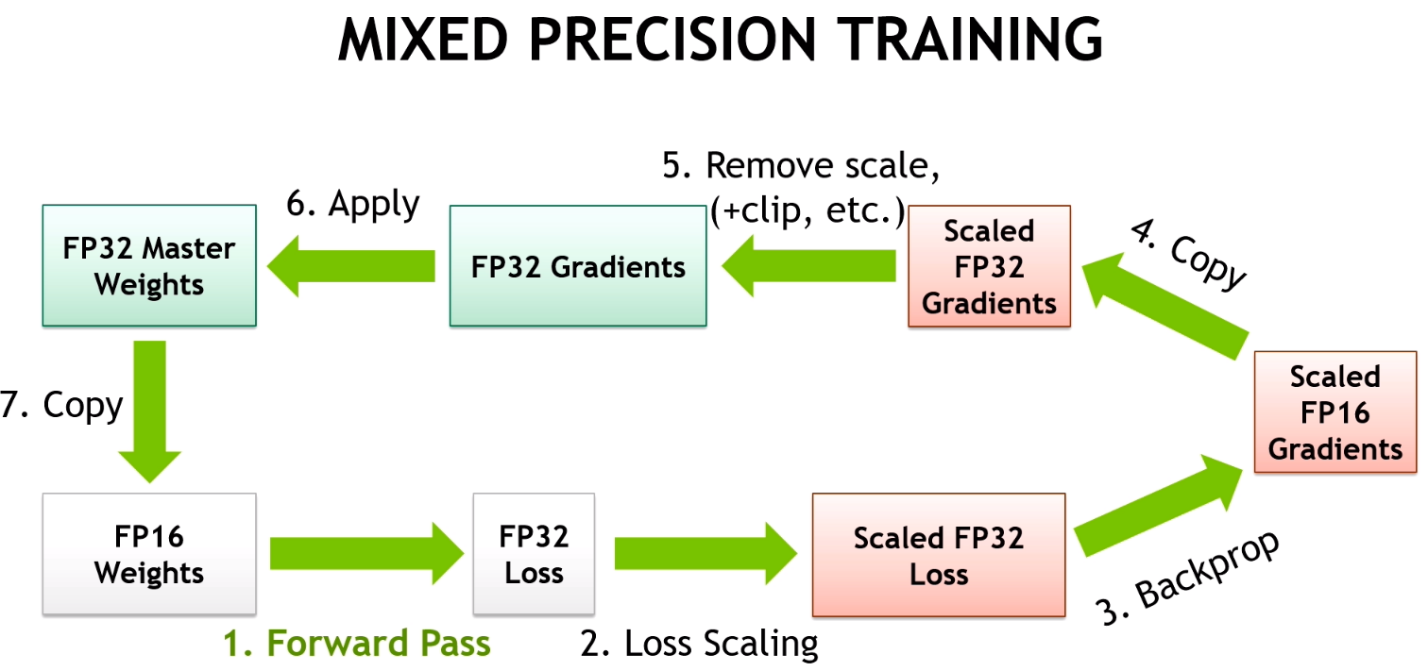
If you're on a GPU that supports it—like a recent NVIDIA card—you can enable mixed precision to cut memory usage and increase speed.
Here’s the setup:
python
CopyEdit
from tensorflow.keras import mixed_precision
mixed_precision.set_global_policy("mixed_float16")
Once set, TensorFlow layers automatically start using 16-bit floating point instead of 32-bit where possible. This doesn’t break your model; it simply speeds things up by reducing the computation load on the GPU.
Be aware that not every model will benefit the same way. For instance, BERT-based models usually show improvement, while smaller models may not see as much difference. Still, if you’re deploying or serving models, the performance gain here is often substantial.
4. Export and Use SavedModel Format for Serving
TensorFlow’s graph optimizations work best when the model is fully frozen into a SavedModel. This isn't just about saving the weights; it's about freezing the architecture and everything TensorFlow needs to skip the Keras overhead.
Here’s how you do it:
python
CopyEdit
model.save("saved_model_path", include_optimizer=False, save_format="tf")
Then, reload it like this:
python
CopyEdit
reloaded_model = tf.keras.models.load_model("saved_model_path")
You’ll notice something right away—loading is faster, inference is smoother, and if you plan on scaling this model across multiple devices, this format plays nicely with TensorFlow Serving.
5. Use tf.data Pipelines Correctly
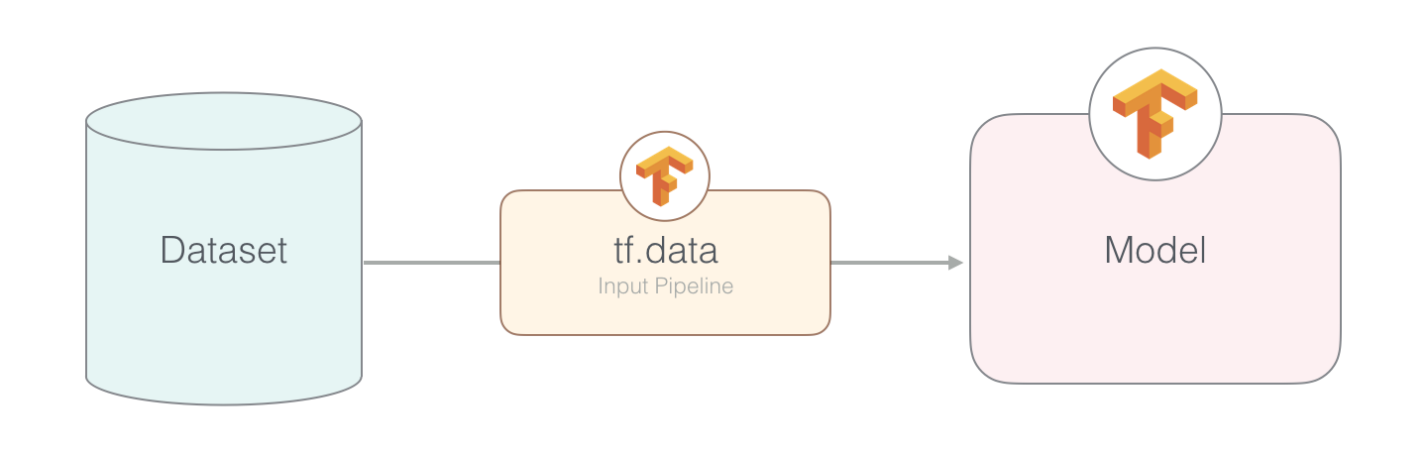
When it comes to batching, feeding data efficiently can be the difference between good and great performance. Instead of manually passing lists or NumPy arrays to the model, build a tf.data.Dataset. TensorFlow optimizes these pipelines under the hood.
Example:
python
CopyEdit
def encode(texts):
return tokenizer(texts, padding="max_length", truncation=True, return_tensors="tf")
texts = ["This is a sample sentence.", "Here’s another one."]
inputs = encode(texts)
dataset = tf.data.Dataset.from_tensor_slices((dict(inputs)))
dataset = dataset.batch(16).prefetch(tf.data.AUTOTUNE)
By batching and prefetching, you’re letting TensorFlow load the next batch while the model is working on the current one. That keeps the GPU busy without wasting cycles waiting for data.
6. Remove Unused Model Outputs
Many Hugging Face models return more than just the logits. You might get attention weights, hidden states, or other intermediate results depending on how you call the model.
If you only care about the final predictions, use:
python
CopyEdit
outputs = model(inputs, training=False)
logits = outputs.logits
Or if you’re going fully optimized:
python
CopyEdit
@tf.function
def fast_predict(inputs):
return model(inputs, training=False).logits
This makes sure you're not carrying around extra tensors that slow down inference. You wouldn't carry an entire backpack if all you needed were your keys.
7. Disable All Tokenizer Overhead at Inference
Tokenizers in Hugging Face come with options like return_attention_mask, return_token_type_ids, and more. These are helpful during training but can slow things down at inference if unused.
When you're preparing inputs purely for predictions, cut them down to the essentials:
python
CopyEdit
tokenizer(
texts,
padding="max_length",
truncation=True,
max_length=128,
return_tensors="tf",
return_attention_mask=True # Only include what your model expects
)
Skip return_token_type_ids if you're using a model that doesn’t need it (like RoBERTa). You’ll get a leaner tensor and faster preprocessing.
Wrapping Up
Getting faster TensorFlow models in Hugging Face isn’t about switching to something else—it’s about using the tools already available, just more intentionally. A handful of lines can turn sluggish performance into something production-ready. No need for exotic tricks or deep dives into C++ extensions.
Start with the way you load your model. Then look at how you wrap inference functions. Enable mixed precision if you can. Use SavedModel for deployment. And feed your data the right way with tf.data. Each step adds a layer of efficiency, and they add up quickly. By optimizing from the ground up, what you’re left with is a model that doesn’t just work—it works when it counts.